Science · Partner school
Learning to Build a PC for Science Credit
A middle school student researched computer hardware, designed diagrams, and outlined assembly steps toward a Science credit.

Dr. Tanner Bowman
Founder, Optio ·
What the student did
Christian, 13, completed a multi-step study of computer architecture to understand how hardware components function and interact. Christian defined the core functions of essential parts including the processor, graphics card, motherboard, and power supply.
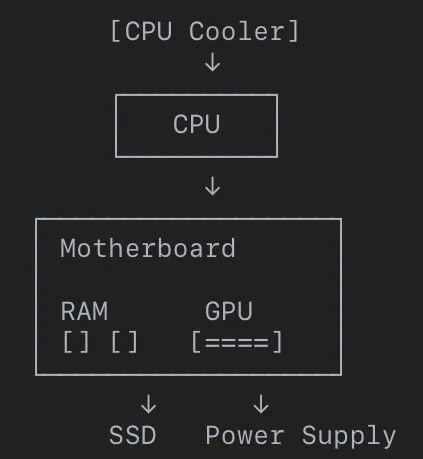
To explore how data flows through a machine, Christian mapped the physical and logical connections between components. Christian analyzed how random-access memory handles active applications, how graphic processing units render pixels, and how air and liquid cooling systems regulate thermal output.
Christian also researched component pricing across current market hardware and wrote a step-by-step technical guide for assembling a desktop computer from scratch.
The tasks
Each task was submitted and reviewed on its own. XP is earned per task; the credit is the sum.
| Task | Subject | XP | Criteria met |
|---|---|---|---|
| Learn PC Parts and Their Jobs | Science | 100 | 1 of 1 |
| Build a PC Parts Diagram | Science | 100 | 1 of 1 |
| Understand Computer Memory (RAM) | Science | 100 | 1 of 1 |
| Investigate How GPUs Create Pictures | Science | 100 | 1 of 1 |
| Learn About PC Cooling Methods | Science | 100 | 1 of 1 |
| Compare PC Components and Prices | Digital Literacy | 100 | 1 of 1 |
| Explain PC Building Steps | Digital Literacy | 75 | 1 of 1 |
More of the evidence
Shown as submitted, minus anything the family did not agree to share.
-
CPU The brain of the computer. It thinks and follows instructions. GPU Graphics Card Creates pictures, videos, and game graphics. RAM Stores information the computer is using right now. Storage Saves files, games, and pictures permanently. Motherboard Connects every computer part together. Power Supply Provides power to all parts. Cooling System Keeps the computer from overheating. Case Holds and protects everything.
-
RAM works like a workbench. Imagine building Legos: A tiny table means less room to work. A big table gives more space. RAM stores things the computer is using right now. Games, programs, and apps are temporarily placed in RAM while running. More RAM allows: More programs open Better multitasking
-
A GPU creates images by drawing millions of tiny dots called pixels. CPU sends instructions. GPU calculates colors, lighting, and shapes. GPU builds the image. GPU sends it to the monitor. The monitor displays the picture. The GPU acts like a super-fast artist creating many pictures every second.
-
Air cooling moves away, hot air so more he can absorb into cooler air and it repeatedly move the hot air out of the way some more cool air can come and more heat can go into it Liquid cooling uses liquid to absorb the heat then it goes to fans and the fans cool the liquid off and then the cool liquid comes back and absorbs the heat again
-
The CPU is around $400 30 GB ram is around $300 RTX is around 350
-
Install the CPU into the motherboard. Install RAM. Attach the CPU cooler. Put the motherboard into the case. Install the power supply. Install storage drives. Add the graphics card. Connect cables. Turn on the PC. Install Windows and drivers
What the teacher checked
The criteria belong to the task. An Optio teacher marked each one from the evidence.
- Met
Find pictures of each PC part and write down what each one does. Think of it like a team where each player has a special role.
- Met
Draw a picture of a PC and label where each part goes. Explain how they connect and talk to each other.
- Met
Learn what RAM does for a computer. Think about how it's like a workbench where the computer keeps things it's using right now.
- Met
Find out how the graphics card (GPU) makes images appear on your screen. Explain this process in simple terms.
- Met
Research different ways PCs stay cool, like fans and liquid cooling. Draw a simple picture showing one cooling method in action.
- Met
Look up the prices for 3 different types of computer parts (like CPUs or graphics cards). Make a simple chart showing the prices.
- Met
Imagine you are teaching a friend how to build a PC. Write down the main steps in a clear, easy-to-follow list.
What it counted for
This project earned 675 XP toward a Science credit. It stands as one project among several that build toward a full high school course credit. The credit reflects the technical understanding shown in the submitted evidence rather than time spent.
Optio students earn XP for finished work instead of letter grades. An Optio teacher reviews the evidence against the task's criteria and awards the XP. 2,000 XP is one high school credit on an Optio Academy transcript.
Learning to build a PC
Official transcript · Optio Academy
Questions about Optio
Can hands-on technology projects count toward academic credit?
Yes. When students investigate real-world systems like computer hardware or software, their research and technical work align directly with science and digital literacy standards.
How does an independent project become an official assignment?
Students outline their goals and break their work into discrete, verifiable tasks with clear criteria. Once evidence is submitted, a licensed teacher evaluates the work against those criteria and provides feedback.
What do XP and credits represent on a transcript?
XP measures masteries demonstrated across individual tasks, where 2000 XP equals one full high school credit. These credits transfer directly onto an official transcript under standard academic course titles.
Stories are written from real submissions on Optio. Student details are anonymized unless a family has recorded consent, and evidence is shown as submitted, minus anything a family did not agree to share. Published September 18, 2026, updated September 24, 2026.